About a year ago while working as an advisor for an undergraduate student’s thesis about foley sound design, I discovered an interesting online tool— Krotos Footsteps Creator. It wasn’t so much the mixing of four different footstep sound banks that fascinated me so much as the use of 2D space (a basic XY screen) that blended new sounds together with each new click.
I was instantly reminded of UX controller surfaces (i.e., Wacom tablet, iPad) and FX paradigms (Risenge Pro, Korg Kaoss Pad) that I’ve used in my own work, each with their own set of unique performance interactions.
Observing the basic functionality of the online tool I found four sets of audio samples that are randomly selected, and each sample bank appears mapped to a corner of the XY pad with its gain linked proportionally to its respective corner. This led me to research a mathematical equation that could provide this functionality: bilinear interpolation (Figure 1). Bilinear interpolation is a mathematical method that can be used to set weights of a four-corner grid based upon a specific (x,y) point. The weights blend the corner values such that they always sum to 1 at any (x,y) point. A 1 sum value is great for audio gain as our overall output gain will always be 1, which will help avoid distortion on the output.
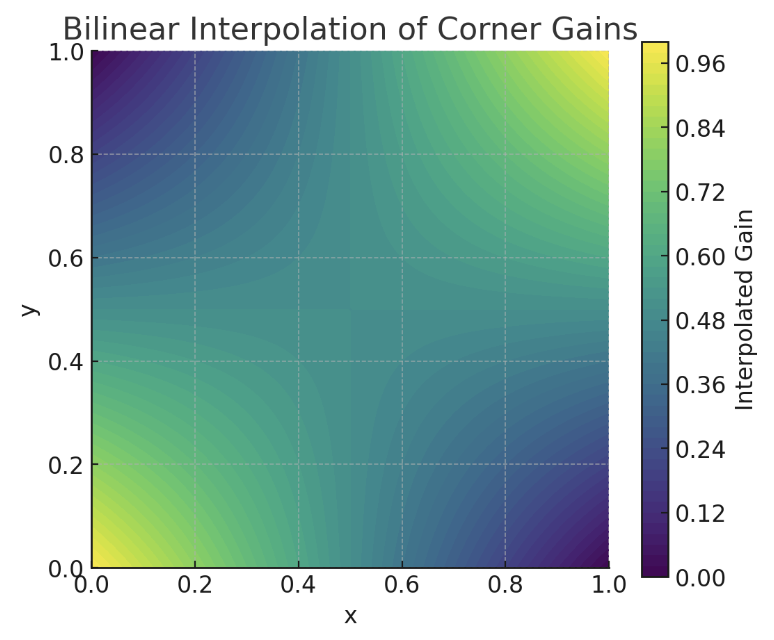
Figure 1. Bilinear interpolation
While each of the four gains do not account for logarithmic amplitude in human perception, the basic math for four corner weights solved the problem I was after by having proportional proximity (i.e., the closer a point is to a corner, the more weight that corner gets) and level gain on the output (i.e., all gains sum to 1). Video 1 shows the math at work using Kyma’s virtual control surface (VCS) and Equation 1 shows how corner weights are calculated.
Video 1. Bilinear interpolation math at work in Kyma’s VCS (silent video).
Given a point (x, y) where x, y ∈ [0, 1]:
Top-left (0,1): wTL = (1-x) * y
Top-right (1,1): wTR = x * y
Bottom-left (0,0): wBL = (1-х) * (1-y)
Bottom-right (1,0): wBR = x * (1-y)
wBL + wBR + wTL + wTR = 1
Equation 1. Weight of four corner gains
After building a quick example in both Max/MSP and Kyma, I set my exploration aside in the hopes I would find more time to dedicate toward the idea. In mid 2026, on the heels of creating a sound effects EP released on a production library and in the middle of composing a new fixed media work, I found myself desiring a system to help me quickly build hits and other SFX layers. I wanted a tool to dynamically combine sounds together with each new trigger. Since impact hits and designed sounds often utilize combination and modulation strategies, I was inspired to expand this bilinear interpolation proof-of-concept into a sound design system within Kyma, leveraging the Wacom tablet as the UX interface.
I turned toward crafting a XY Bilinear Interpolation SoundToGlobalController (STGC) and a modular Multisample sound bank Sound for the corners of the 2D surface. These modules are predicated on combining multiple sounds with every new !Trigger and modulating those active sounds using the XY surface. Videos 2 and 3 demonstrate the basic prototype in action, each depicting different sound banks.
Video 2. Basic prototype of polyphonic FX creator using Wacom tablet. Custom Wood+Metal foley sounds
Video 3. Basic prototype of polyphonic FX creator using Wacom tablet. Custom sound designed Impacts
In re-triggering sounds on the Wacom, there is a random index selection for each sound bank, and there’s a bit of pseudo randomness in pitch and timing for organicism in playback. Gains of the four sample banks are dependent on the (x,y) coordinate of finger position on the Wacom using bilinear interpolation. Triggering can be easily altered to a different touch surface like iPad.
Custom Kyma Sounds for the dynamic FX generator
After a basic prototype, I found Kyma Sounds were getting bulky to spin off sonic evolutions and ideas for FX processing. I encapsulated a few basic prototype modules — bilinear interpolation math for weights and a basic polyphonic sample bank — to assist idea iteration (Figure 2).
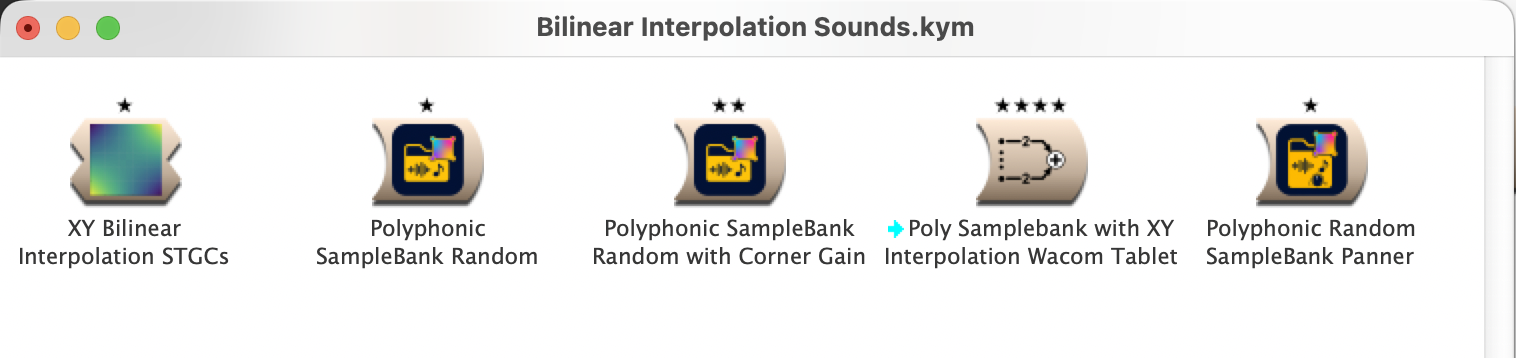
Figure 2. Bilinear Interpolation and Polyphonic SampleBank Encapsulations. These Sounds use an XY space (i.e., Wacom tablet) to combine multiple samples where gain is a function of (x,y) location.
There are three main encapsulations in the initial prototype:
XY Bilinear Interpolation STGCs implements the four-corner weight math attached to an XY interface (e.g., Wacom tablet). The main version takes an (x,y) coordinate between 0-1 and specifies silent SoundToGlobalController hotValues for each corner weight gain (!wTL, !wTR, !wBL, !wBR).
Polyphonic Sample Bank Random is a Multisample into a Replicator that wraps up most of the voice stealing but exposes the Frequency field for pitch- and time-shifting as well as the gain control, which is intended to be linked to bilinear interpolation.
Polyphonic Random Sample Bank Panner adds a Panner before the Replicator and exposes its pan parameter to access individual voice control. The default example pans each voice slightly around center.
Where Does One Go From Here?
Feel free to download these Kyma Sounds and starter kit from the Kyma Community Library[1] and have fun! I’ve included pre-encapsulation workflow as well to show what’s included and enable the most flexibility for sound design. I’ve included some basic sound banks to get one started, as well as examples of some custom foley sounds to show how the combiner works with bilinear interpolation on a Wacom tablet. Kyma Sounds and examples are meant to assist unique sound FX generation quickly using performative methods as you watch or imagine a scene. The dynamically triggered sounds help ensure similar but never exactly repeated results.
For more functionality, you may simply add an FX at the end of a Polyphonic SampleBank; you may find that there’s lots of sonic territory to discover with your folders of samples. Exploring dynamic sound FX generation, bilinear interpolation and a Wacom tablet seems like the tip of the iceberg. Future work may include other modulation ideas, like morphing between four different sound folders or adding in a more user-friendly way to set time delay in each bank (to help build sounds similar to how SFX might be layered — Onset, Body, Thump, and Tail — that require different start times).
All the Sounds uploaded from this article to the Kyma Community Library are free! Encapsulations I’ve made are for you to use and modify as you wish; the CC BY-NC-SA 4.0 simply means they cannot be repackaged and sold. Have fun Kyma users!
AI Statement and Acknowledgements: Perplexity AI was used in researching the bilinear interpolation math found in these human-made Kyma encapsulated Sounds. No AI was used in the making of Kyma Sounds nor in the writing of this article. Sample banks and Kyma Sounds were made in part with support from a 2026 University of Oregon Summer Stipend in Creative Arts.
1 You can download the entire Kyma Community Library from the Help menu by choosing Check for Community Library updates. This contribution (and others) will appear in the Sound Browser in Kyma. ↩